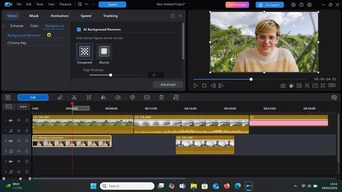
PowerDirector 365 Adds an AI Agentic Editor: What Video Creators Need to Know
Editing software is becoming increasingly capable of responding to instructions rather than relying entirely on manual timeline adjustments. For video creators, that could mean spending less time navigating menus and more time shaping the finished content. On 20 October 2026, CyberLink announced a series of updates to PowerDirector 365, including a new Agentic Editor Panel designed to bring AI-assisted editing directly into the existing workflow.
The update also introduces new options for finding title templates, generating video content and working with AI-assisted creative tools. But what do these changes actually mean for YouTubers, filmmakers and social media creators?
What is the new PowerDirector Agentic Editor?
According to CyberLink’s official PowerDirector update page, the Agentic Editor Panel allows users to request edits to selected clips, source files or imported media without leaving the timeline.
Rather than navigating through individual editing controls for every operation, creators can ask the software to carry out a task using an AI-assisted interface.
CyberLink says the resulting media can be returned directly to the timeline or media library.
This approach could be particularly interesting for creators producing videos regularly. When working on weekly YouTube uploads, short-form social content or client projects, even relatively small editing tasks can become repetitive. However, the announcement describes the intended functionality rather than providing independent evidence of time savings. Creators should test the feature against their usual editing methods before changing an established workflow.
AI-assisted title searching could simplify video production
Another addition is AI Search Title, which allows users to describe the appearance of a title rather than manually searching through template categories. For example, a creator looking for a handwritten title, a neon-style graphic or a particular visual mood can describe that appearance to the software. This may help when producing videos that need a consistent visual identity, especially where titles, captions and on-screen graphics are used repeatedly.
The important distinction is that this feature helps users locate matching title templates. It should not be confused with a guarantee that the software can create any typography or animation style from scratch.
New AI video-generation options
CyberLink’s October update also expands its AI-assisted video tools. The company lists additional models for conversational video editing and image-to-video generation, alongside a custom output-resolution option for AI-generated video. For creators who use generated visuals as part of an edit, having several models available within one application may provide more flexibility. A documentary creator might use generated imagery for an illustrative sequence, while a social media editor might experiment with animated backgrounds or short visual transitions.
However, generated footage still needs careful review. Visual consistency, factual accuracy, commercial usage rights and the suitability of the output for a particular project all remain important considerations. Creators should also check the current availability, credits and subscription requirements of individual AI tools before relying on them for paid work.
What about sound and music?
The October release also includes new video effects with accompanying sounds, as well as a Lyrics to Song feature. The latter allows users to generate a song from lyrics or an idea, with choices relating to musical style, singer and duration. For some creators, this could provide another way to experiment with sound during the editing process.
However, a tool’s ability to generate music does not automatically answer every licensing question.
Before using generated music in a monetised YouTube video, advertisement or client production, creators should check the software’s current terms covering commercial use, ownership, distribution and any restrictions that apply to the generated output.
Alternatively, creators can work with music that has already been licensed for their intended project.
Should existing PowerDirector users change their workflow?
The most sensible approach is to experiment with one feature at a time. Start with a project you already understand. Try the Agentic Editor on a duplicate clip, compare the result with your usual process and check whether it gives you enough control over the final edit.
If you regularly use title templates, test whether natural-language searching helps you find suitable graphics more efficiently.
For AI-generated footage, pay particular attention to consistency between shots and whether the output meets your project’s technical requirements.
These checks will help establish whether the new tools offer a practical improvement for the type of content you actually produce.
What remains unclear?
CyberLink’s release notes confirm the announced functionality, but they do not establish that every creator will experience faster editing or better results. Feature availability, supported systems, AI usage allowances and commercial terms may also depend on the current software edition or subscription.
Before upgrading or purchasing, consult CyberLink’s current product documentation and account-specific feature information.
The bigger picture for creators
The latest PowerDirector update reflects a broader shift towards editing tools that respond to creative instructions. For independent creators, the appeal is straightforward: reducing repetitive production tasks could leave more time for storytelling, sound design and polishing the finished video. Yet automation works best when it supports creative decisions rather than replacing them entirely. A well-edited video still needs a clear structure, effective pacing and audio that complements the visuals.
For creators looking for music and sound effects to support their edits, RouteNote Licensing provides a dedicated catalogue to explore.
Choose music that suits your project, check the applicable licensing terms and keep the relevant licence information with your production files.